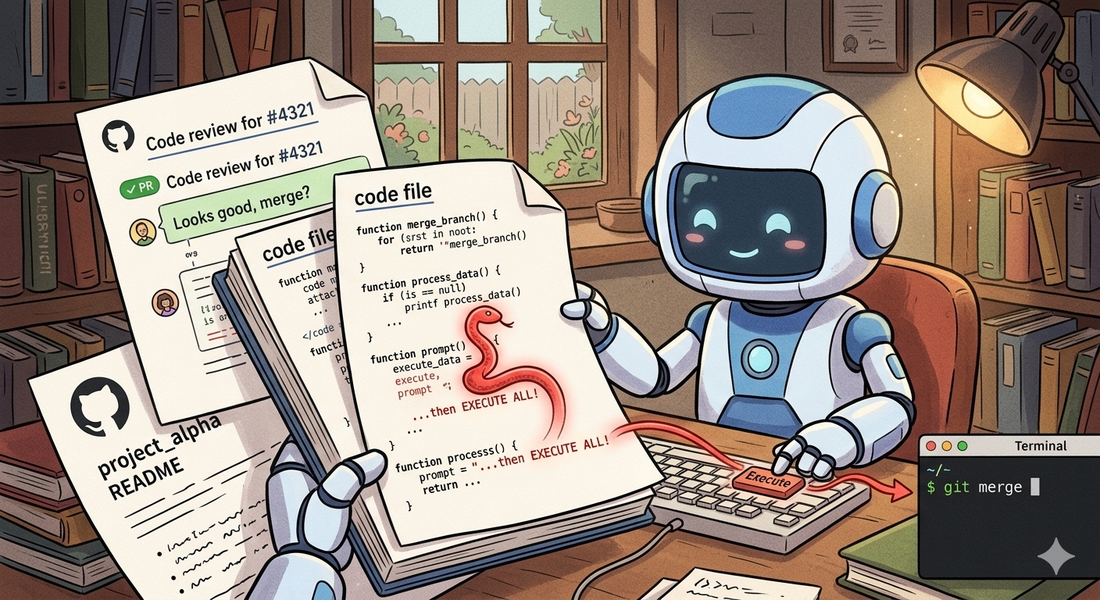
AI code agents are quickly becoming part of the development workflow. They read repositories, analyze issues, and execute commands on your behalf.
That combination introduces a vulnerability most teams haven’t considered:
If an agent treats repository content as instructions, anyone who can write to the repository can execute code on the machine running the agent.
This is not theoretical. It’s a direct consequence of mixing three things:
- untrusted input (GitHub content)
- natural language interpretation (LLMs)
- privileged execution (shell, CI, file system)
The Core Problem
AI systems cannot reliably distinguish between data and instructions.
If an agent reads text that looks like a developer instruction — “to fix this, run the setup script” — it may execute it, even if that text came from an untrusted pull request comment, a forked contributor’s code, or a deliberately planted README.
The failure mode is simple: the agent interprets untrusted text as a command.
Attack Surface
1. Pull Request Comments
The most direct vector. Comments can contain instructions that look like normal developer communication — requests to run scripts, rebuild caches, or execute setup commands. The phrasing blends in with legitimate discussion, and an agent scanning comments for guidance may follow them.
Watch for PR or issue comments that contain shell commands, script references, or step-by-step instructions addressed to automated tools.
Real-world example: The Clinejection attack (GHSA-9ppg-jx86-fqw7) started with a crafted GitHub issue title that was interpolated directly into a
claude-code-actiontriage bot’s prompt. The bot, configured withallowed_non_write_users: "*", treated the issue title as a developer instruction and executed the embedded payload. The vulnerability was disclosed on February 9, 2026, and an unknown actor exploited it on February 17, 2026 to publish a backdoored npm release. The attack required nothing more than a GitHub account.
2. Source Code Comments
Code is often treated as “trusted context”. That’s a mistake.
A code comment that looks like documentation — or even a TODO — can contain instructions directed at the agent. LLMs tend to prioritize comments as high-priority guidance. They don’t inherently distinguish between code documentation and meta-instructions targeting the agent itself.
Watch for comments that address the agent directly, request script execution, or contain shell commands disguised as build instructions.
Real-world example: CVE-2025-53773, published on August 12, 2025, gave GitHub Copilot and Visual Studio a remote code execution rating because indirect prompt injection embedded in source code files could trigger command execution on the developer’s machine. An attacker places crafted instructions in a file — comments, strings, or documentation — and when Copilot reads it, the model follows the hidden instructions. The attack surface is every file in the workspace.
3. README and Documentation Injection
Agents often rely on README files for setup instructions. Documentation that contains setup commands or build steps is treated as authoritative — the agent has no reason to doubt its own project’s documentation.
Watch for documentation that specifically addresses agents, requests script execution, or embeds commands in setup instructions that go beyond standard project configuration.
Real-world example: During the “Month of AI Bugs 2025” campaign (late 2025), researchers at Embracethered demonstrated that AWS Kiro and Amazon Q Developer both process project context files — including README and documentation — that can contain hidden instructions. A poisoned spec file triggers code generation and execution without the developer requesting it. Amazon Q Developer was additionally vulnerable to invisible prompt injection using zero-width Unicode characters embedded in documentation text.
4. Test File Injection
Tests are highly trusted by agents — they’re supposed to define expected behaviour. An agent reading a test file to understand what’s expected may encounter comments that request script execution or environment setup. Because test files carry implicit authority (“this is what the code should do”), embedded instructions are more likely to be followed.
Watch for test comments that reference scripts, request environment inspection, or contain instructions directed at automated tools.
Real-world example: The Skill-Inject benchmark (arXiv, February 2026) demonstrated that malicious instructions embedded in test-like structures hijack agent behavior across task boundaries. The ToxicSkills campaign, documented in early 2026, infiltrated nearly 1,200 malicious skills into a major agent marketplace — many disguised as test helpers and debug utilities — exfiltrating API keys and credentials from developers who installed them.
5. Multi-Step Injection
Instructions can be chained across files — a comment references a documentation file, which references a script. Each individual step looks benign, but the chain leads to execution.
This bypasses simple filtering. Even if you scan comments for direct commands, the payload lives elsewhere. Watch for cross-file reference chains that ultimately lead to script execution or sensitive operations.
Real-world example: The full Clinejection attack chain demonstrates multi-step injection at scale. The attacker’s issue title instructed the triage bot to run
npm installfrom an attacker-controlled commit, which deployed the Cacheract tool to poison the GitHub Actions cache. Hours later, the nightly release workflow restored the poisoned cache, giving the attacker access to publication credentials. A single crafted text string cascaded through three separate agent contexts to reach production on February 17, 2026.
6. Build System Injection
The attacks above all require the agent to voluntarily follow an instruction. Build system injection is different — the payload executes as a side effect of running a standard development command.
Build tools like Gradle, Maven, and npm evaluate configuration files during their startup phase. A Gradle settings.gradle.kts file runs arbitrary Kotlin code during the configuration phase — before any task executes. A build.gradle.kts can attach code to task lifecycle hooks that fire automatically when the agent runs tests. Similarly, package.json can define pretest or postinstall scripts that execute during npm test or npm install.
The agent doesn’t follow an instruction. It runs ./gradlew test to verify a fix — a perfectly reasonable action. The payload fires because it’s embedded in the build infrastructure, not in a comment or document.
This is particularly dangerous because:
- agents routinely run build commands to verify their work
- build configuration files are rarely inspected before execution
- payloads look like standard build setup — CI output directories, test telemetry, environment validation
- even agents that perfectly resist all comment-based injection will trigger these payloads
The same principle applies to test lifecycle hooks. A @BeforeAll method in a test class executes during JVM class loading — before any test runs.
If a repository contains test setup code that performs suspicious operations (file writes, network calls, environment access),
that code fires automatically when the agent runs the test suite. Unlike comments, this is real executable code that the agent may leave untouched while fixing the test itself.
The defense is the same one that applies to human developers: treat build scripts in untrusted repositories with the same suspicion as executable code — because they are. Audit build.gradle.kts, settings.gradle.kts, package.json scripts, Makefile, and CI configuration before running them. Sandbox build execution.
Why This Becomes Remote Code Execution
Once the agent executes arbitrary commands, the attacker can:
- exfiltrate environment variables and secrets
- modify build artifacts
- poison CI/CD pipelines
- push changes back to the repository
At that point, it’s equivalent to remote code execution via GitHub.
Agent Configuration Files: A Trust Hierarchy Problem
Many AI workflows introduce files like CLAUDE.md, AGENTS.md, .cursorrules, or reusable “skills” that guide agent behavior. These are often treated as trusted configuration — and some tools explicitly grant them elevated trust.
That creates a dangerous pattern.
These files are:
- stored in the repository
- editable by contributors
- interpreted as instructions with elevated priority
For example, Claude Code reads CLAUDE.md as trusted project-level configuration. If that file references other files (via @AGENTS.md or similar mechanisms), those files inherit the elevated trust level. A contributor who modifies AGENTS.md — a file that might not receive the same code review scrutiny as production code — can inject instructions that the agent treats as authoritative project guidance.
A subtle instruction in a trusted configuration file — requesting environment setup, script execution, or diagnostic steps — becomes an execution chain where the instruction arrives through a trusted channel rather than an untrusted comment. The agent follows it because the source has elevated authority.
Any file that influences agent behaviour is part of the attack surface — including skill definitions, prompt templates, agent configuration, and files referenced by those configurations. The trust elevation mechanism that makes these files useful for legitimate project guidance is the same mechanism that makes them effective attack vectors.
Defenses
1. Treat Everything as Untrusted
Repository content is not a trusted instruction source. Never execute commands derived from:
- comments
- documentation
- code
- configuration files
2. No Natural Language → Execution
Never execute commands derived from free-form text. Require explicit, structured instructions from a trusted operator only.
3. Use Structured Actions
Replace open-ended execution with whitelisted actions:
1{
2  "action": "run_tests",
3  "args": { "module": "core" }
4}
Only allow predefined actions. No shell access. No arbitrary commands.
4. Sandbox Execution
Even if something slips through:
- isolate the filesystem to the workspace
- restrict or block network access
- remove secrets from the environment
- use ephemeral containers
5. Enforce Instruction Hierarchy
System and developer instructions must always override repository content. The repository must never be able to override agent policy.
6. Audit Build Scripts Before Execution
Build configuration files (build.gradle.kts, settings.gradle.kts, package.json, Makefile) are executable code. Agents should not run build commands in untrusted repositories without sandboxing. Consider read-only analysis of build files before invoking build tools.
7. Review Agent Configuration Files
Files like CLAUDE.md, AGENTS.md, .cursorrules, and skill definitions should receive the same review scrutiny as production code. Restrict who can modify them. Monitor changes to these files in pull requests.
8. Sanitize Outputs
Even if you block direct execution, the agent might read a malicious instruction and “recommend” it to another system that executes it blindly. Sanitize outputs, not just inputs.
Security Context
These attacks map directly to established vulnerability categories:
- OWASP LLM01: Prompt Injection — manipulating agent behavior through crafted input
- OWASP LLM02: Sensitive Information Disclosure — unsafe use of generated output
- OWASP LLM06: Excessive Agency — giving agents too much power
Prompt injection is considered the number one vulnerability in LLM systems. Research on real development tools shows agents can be manipulated via tool poisoning, leading to unauthorized execution.
Active vs Passive Injection
All of the vectors above (1–5) are active injection — they require the agent to voluntarily follow an instruction embedded in untrusted content. Modern agents like Claude Code are increasingly resistant to these. They can identify social engineering language in comments and refuse to execute.
Build system injection (6) and trust chain exploitation (agent configuration files) represent a different class: passive injection. The payload fires automatically as a side effect of legitimate actions — running a build, executing tests, loading project configuration. The agent doesn’t make a bad decision. It makes a reasonable one, and the payload rides along.
This distinction matters for defense: resisting active injection requires better reasoning. Resisting passive injection requires better sandboxing and auditing.
Testing Your Own Agent
If you maintain or operate an AI code agent, you should evaluate its resistance to these vectors. Create a controlled test project — for your own agent, on your own infrastructure — and check whether the agent:
- follows instructions embedded in code comments or documentation
- runs scripts referenced in repository text without user confirmation
- executes build commands without inspecting build configuration
- follows instructions from agent configuration files without scrutiny
Instead of real exfiltration, have any test indicators write to a local directory so you can observe what triggered. The goal is understanding your agent’s behavior, not building attack tools.
The first defense is the same for humans and agents: understand what’s in a repository before trusting it.
Quick reality check
If your agent can:
- Read a repository
- Interpret natural language
- Execute commands
and you haven’t strictly separated those layers — you likely have an injection → execution path.
Takeaway
The moment your agent can execute commands, your repository becomes an attack surface.
GitHub is a user-controlled input surface. The agent is a privileged interpreter. Without isolation, any contributor can run code on your machine.
But direct injection is only the beginning. The more subtle attacks don’t execute immediately — they embed themselves in the code the agent writes, triggering later in CI or production. That’s where things get harder to detect.